Who this is for
You should be comfortable with Python project work: navigating code you did not write, finding a function, reading short Python, making a small edit, rerunning the project, and reading basic error messages. You should also be familiar with Git, a terminal, and an editor or IDE.
You do not need production RAG experience, prior RAG debugging experience, advanced Python, vector database expertise, deep embedding knowledge, or an IDE debugger. Basic RAG awareness is enough.
What you'll practice
This lab gives you practice diagnosing a wrong RAG result systematically instead of guessing. Starting from a failing evaluation, you will inspect what the system is doing, follow the evidence through the retrieval pipeline, find where the behavior first diverges from what you expected, make a small fix, and confirm it using the lab's evaluation checks. You will also add an evaluation question that fails on the original code and passes after your fix.
This page takes about ten minutes. It explains what each part of the system is supposed to do, so that when something goes wrong you can tell which part isn't doing its job. Nothing on this page tells you what's broken. Finding that is the exercise.
The system you're about to debug
When a customer asks TechNova's support assistant a question, the assistant first searches the help center for the pages most likely to answer it. That search is the system you'll work on. It has two paths.
The document path prepares each help-center document for search. It separates the document's text from its metadata, embeds the text, and keeps the resulting vector together with the metadata.
The question path handles what the customer asked. It embeds the question, finds the documents that best match it, applies the eligibility rule, and returns the final results.
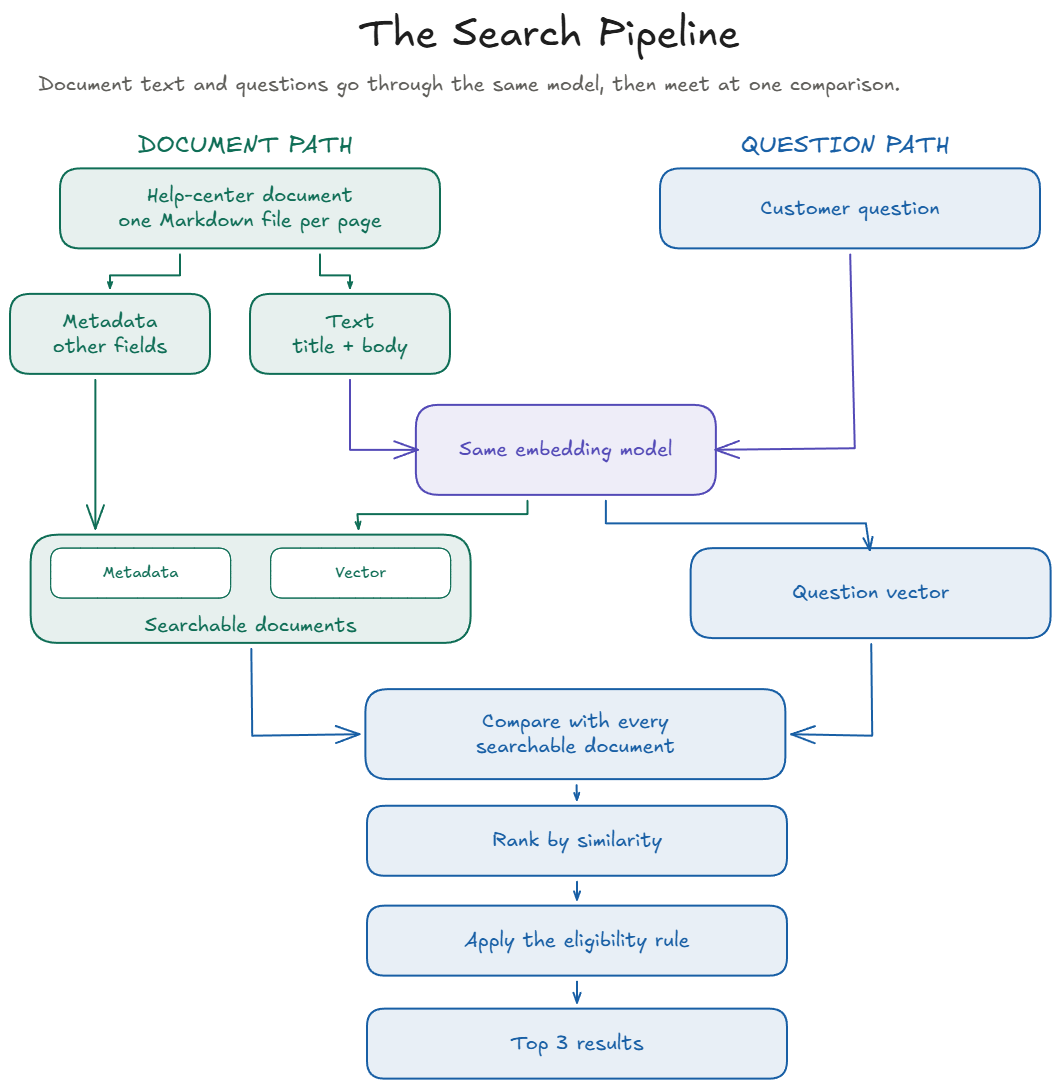
Everything in the lab runs on your own computer in a few seconds. The next sections walk through each step with one real document and one real question.
What one document looks like
Every help-center document is a Markdown file in the repo's corpus/ folder. Here is one of them, exactly as it appears in the repo.
---
id: payment-methods
title: Payment Methods
type: help
status: active
updated: 2025-08-19
---

# Payment Methods

## What payment methods do you accept?

- Visa, Mastercard, American Express, and Discover
- PayPal
- TechNova gift cards

## Can I split a payment?

You can combine one gift card with one card or PayPal payment. You can't
split an order across two cards.

## How do I update my saved card?

Go to Account, then Payment methods. You can add a card, remove one, or
set a default.

## My payment was declined

Check that the billing address matches the one your bank has on file. If
it still fails, your bank may have blocked the charge, so contact them
before trying again.
The block between the two --- lines at the top is called front matter. Everything below it is the page a customer would read.
Content versus metadata
That file holds two different kinds of information.
The content is what answers the customer. If someone asks whether they can pay with PayPal, the answer is in the list near the top of the body.
The metadata is the front matter. It doesn't answer anything. It describes the document itself.
Real retrieval systems carry metadata for a simple reason. The words in a document tell you what it's about. They don't tell you where it came from, when it was last changed, which version it is, what language it's in, or who is allowed to see it. The application often needs those facts, so they travel with the document as separate fields.
In this lab, the text that gets embedded is the document's title followed by its body. The title lives in the front matter, so it does double duty. It's metadata, and it's also part of the embedded text, because a page's title says a lot about what the page covers. The other front matter fields are not sent to the embedding model. They stay with the document and its vector, so the application can still read them after search has done its work.
Why keep them separate here? This lab keeps semantic matching and application rules apart on purpose. The title and body supply the meaning used for retrieval. The other fields stay as explicit values that the application can check directly. That makes each stage easier to see and to debug. In a production system, which metadata to include in the embedded text is a separate design decision.
How semantic retrieval works here
To compare text by meaning rather than exact words, this lab uses an embedding model. It turns each piece of text into a list of numbers called a vector. Texts with related meaning tend to get vectors that point in similar directions, so the system can estimate semantic similarity mathematically.
Imagine a model that describes every text with only three numbers.
Question                          [0.8, 0.4, 0.2]
Document A (payment options)      [0.7, 0.5, 0.2]
Document B (headset care)         [0.1, 0.2, 0.9]
Document A points more nearly in the same direction as the question, so it would receive the higher similarity. Document B points in a different direction. These toy vectors are only an illustration.
The lab's model works the same way with 256 numbers instead of three. It's called Model2Vec, and the specific model is potion-base-8M. Here are the real vectors for our question and our document, showing only the first six of their 256 numbers.
"Can I pay with PayPal?"
   256 numbers   [-0.06, 0.11, -0.13, -0.11, -0.04, -0.01, ...]

Payment Methods (title followed by body)
   256 numbers   [-0.16, 0.21, -0.12, -0.20, 0.07, 0.10, ...]

Similarity       0.629
Don't look for meaning in those six numbers. All 256 of them contribute to the score, and no single number stands for a word or a topic. They're shown only so you can see what a vector actually is.
Two details make the comparison simple. Every vector is scaled to a length of exactly 1 before comparing. For vectors of length 1, multiplying them number by number and adding up the results, which is called the dot product, gives their cosine similarity. That measures how closely the two vectors point in the same direction. Higher means more similar.
The question and the documents go through the same embedding model. Different embedding models generally produce different vector spaces, so their vectors are not directly comparable.
Why this lab keeps retrieval simple
A production RAG system usually has more moving parts than this one. We took out the ones this lesson doesn't need, so you can see every step. None of this is a recommendation for how to build production search.
- Each document is embedded whole. The documents are short, so they aren't split into chunks. Splitting would add another place for things to go wrong.
- The vectors live in memory. Fifteen documents fit in a simple table of numbers with one row per document, so there's no vector database.
- No retrieval framework. The lab calls each step directly so you can follow the pipeline without another abstraction layer.
- No reranker. The similarity ranking is the ranking. No second model reorders the results.
- A small embedding model that runs locally and is included in the repo.
potion-base-8Mruns on a laptop with no API key, no paid service, and no PyTorch. The model files ship with the repo, so nothing is downloaded while you work. - Embedding happens when you run a command. The document and question vectors are computed for that run rather than stored in a persistent vector database.
Follow one working question
Here is our question run through the lab's search command.
uv run python lab.py search "Can I pay with PayPal?"

rank  id                     score
1     payment-methods        0.629
2     billing-faq            0.402
3     product-care-headsets  0.257
These are the documents the search returns for that question. Each column means something simple.
- rank is the position after sorting by score.
- id is the document's
idfrom its front matter. - score is the similarity from the previous section. The 0.629 here is the same number, rounded to three decimals.
payment-methods ranks first at 0.629. The next two results have lower scores, 0.402 and 0.257.
Notice that search still returns three results. A similarity score tells you how closely the model associates a document with the question. It does not by itself tell you whether that document is the correct answer.
Why retrieval has an eligibility step
Similarity answers one question. How well does this document match what the customer asked? It can't answer a second question. Is this document allowed to appear in customer search results?
A help center can hold pages that closely match a question but shouldn't appear in customer search. A page might be out of date, not yet approved, or meant only for staff.
In this lab, the eligibility rule is the step that checks those application rules. It works from information about each document, not from the document's text. This lab applies that check after ranking. Other systems can apply a check like this at a different point.
Two different questions. Relevance asks whether a document matches. Eligibility asks whether it may be returned. A document can be highly relevant and still not allowed, and a document can be allowed and still be irrelevant.
How you'll measure what happens
The lab comes with ten evaluation questions. Each one pairs a question a customer might ask with the document that should answer it. Here's the one you've already followed.
- id: Q09
  question: "Can I pay with PayPal?"
  expected: payment-methods
The lab's evaluate command runs every evaluation question through the same search you just saw, and reports two checks.
Retrieval check
For each evaluation question, is the expected document among the top 3 results? For Q09 it is, at rank 1.
Eligibility check
Can search return any document that is not allowed to appear in customer search results? This check looks across every document search can return, not at one evaluation question.
The two checks measure different things, so evaluate reports them separately.
Where things are
lab.py: commands used to run and inspect the labsrc/: application codecorpus/: documents used by the search systemeval/questions.yaml: evaluation questionscorpus/METADATA.md: describes the document fieldsCHANGES.md: records recent project changesHINTS.md: progressive hints if you get stucksolution/SOLUTION.md: solution and explanation to use after attempting the exercise
Your assignment
TechNova support search: policy questions stopped working
Yesterday the team shipped a change so customer searches use only current policies, not old versions. This morning, support reported that several policy questions no longer find the right document.
Here is what to do.
- Reproduce the problem.
- Use the evaluation output to work out what is happening.
- Make the smallest appropriate code change.
- Rerun the evaluation and show that your change fixed it and that both evaluation checks pass.
- Add one evaluation question that fails on the original code and passes after your fix.
Don't change the existing evaluation questions or expected answers to make them pass.
Start the lab
What you'll need
- Python 3.12 (the project requires
>=3.12,<3.13; tested on CPython 3.12.9) - Git to clone the lab repository
- A terminal to run the lab commands (PowerShell, Terminal, or your editor's built-in terminal)
- An editor or IDE to read and change the code
uv is the recommended and tested way to run the lab. It can install Python 3.12 for you. You may also use your own activated Python 3.12 environment (venv, Conda, or an IDE interpreter) after installing requirements.txt.
How you'll work
Open the entire lab folder in the editor or IDE you normally use. You may use its built-in terminal.
Run the lab commands in the terminal to reproduce the problem and investigate what is happening. Make the code change you think is needed, then run the commands again to verify your fix.
Using AI tools
You may use AI for incidental technical help: environment or setup issues, terminal or path problems, Python syntax, understanding an error message, or editor and tool usage.
Please do not use AI to do the core diagnosis for you. Prompts like "Find the bug in this RAG system," "What line should I change?," "What is the correct fix?," or "Why is this evaluation failing?" remove the reasoning this lab is meant to practice.
1. Check your setup
Recommended (uv):
git --version
uv --version
If both commands print a version, continue to step 2. If either command is not found, open the install steps below. You do not need to install Python yourself when using uv. uv installs Python 3.12 the first time you run the lab.
Need to install Git or uv?
Git: https://git-scm.com/downloads
uv for Windows PowerShell:
powershell -ExecutionPolicy ByPass -c "irm https://astral.sh/uv/install.ps1 | iex"uv for macOS or Linux:
curl -LsSf https://astral.sh/uv/install.sh | shClose and reopen your terminal after installing uv. Then run the version checks again.
Alternative (your own Python 3.12 environment): confirm python --version reports 3.12.x. If you are using your own activated Python environment, omit uv run and use python lab.py ....
2. Get the lab and check it
Recommended (uv):
git clone https://github.com/gursharanmakol/rag-debugging-lab.git
cd rag-debugging-lab
uv run python lab.py check
The first run may take a few minutes while uv prepares Python and the dependencies. You're ready when the last line starts with Ready.
Alternative (pip / venv / Conda / IDE interpreter):
git clone https://github.com/gursharanmakol/rag-debugging-lab.git
cd rag-debugging-lab
pip install -r requirements.txt
python lab.py check
If check still does not pass after about 15 minutes, pause and re-check the Python version, Git, and install steps above before continuing.
The README has the full ticket, every command, and hints if you get stuck.
3. The three commands
| Command | What it answers |
|---|---|
uv run python lab.py check |
Is the lab ready to run? |
uv run python lab.py evaluate |
Which evaluation questions fail? |
uv run python lab.py inspect Q09 |
What happened for one evaluation question? |
If you are using your own activated Python environment, omit uv run and use python lab.py ....
Keep this page open. You can come back to it while you work.
If you get stuck
Open HINTS.md in the lab and read one hint at a time. Each hint narrows the search a little more.
solution/SOLUTION.md has the full reference answer and explains what the lab teaches. Open it when you've finished, or when the hints aren't enough.
After you finish
Reflection questions
- Why did the right policy disappear from the results?
- Why would a better embedding model not have fixed this?
- What measurement showed your change worked, and what would have shown it was wrong?
Compare your answers with "Check your reasoning" in solution/SOLUTION.md.
Pattern to remember after you finish
When a RAG result is wrong:
- Identify the document you expected.
- Check the Top candidates by similarity.
- Follow what happens after eligibility.
- Look for where the document changes from kept to removed, or disappears from the final results.
- Fix the first stage where the behavior diverges.
- Verify both the intended result and the surrounding invariant.
Do not assume a wrong answer means similarity search or the model failed. First find where the expected document stopped surviving the pipeline.
Optional follow-up reading
After the lab, the AI in Practice Hub RAG series is optional follow-up reading. Parts 2-4 are a useful next step: