TechNova is a fictional company used as a running example throughout this series.
The damaged laptop
A TechNova customer writes in:
“My laptop arrived damaged. I want a refund.”
One message. Two requests, really: one stated, one implied. The customer wants the refund. The system has to decide whether the refund is actually appropriate, and if it is, whether to issue it now or after some other step.
That second job is where it gets complicated. Before any response goes out, the system has to gather the facts, apply policy, and decide what action is allowed, including when a human must approve.
In this case, the seven jobs are: look up the order, check shipping and damage evidence, retrieve the refund/replacement policy, check inventory, choose refund vs. replacement, get approval if needed, and draft a safe response.
Part 1 showed what happens when a system tries to do this kind of work in one prompt: the agent issued a confident refund and skipped the checks that would have caught it. Part 2 named what makes something an agent: a loop where the model can decide the next step and decide when to stop. Part 3 walked through the loop, state, context, and stopping conditions.
This article asks the next question. What are the common shapes this work can take? And what knobs decide whether those shapes are safe enough to ship?
The short version: agent patterns are named shapes for arranging the work. Control surfaces decide how safe, bounded, and production-ready those shapes are. Here, “agent pattern” means a reusable shape an agentic system can use. Some of these shapes are workflows, not standalone agents.
By control surface, we mean a place where the system puts boundaries around the agent: what it can call, what context it can use, when it must stop, and when it must ask for help. We will define each one when it comes up.
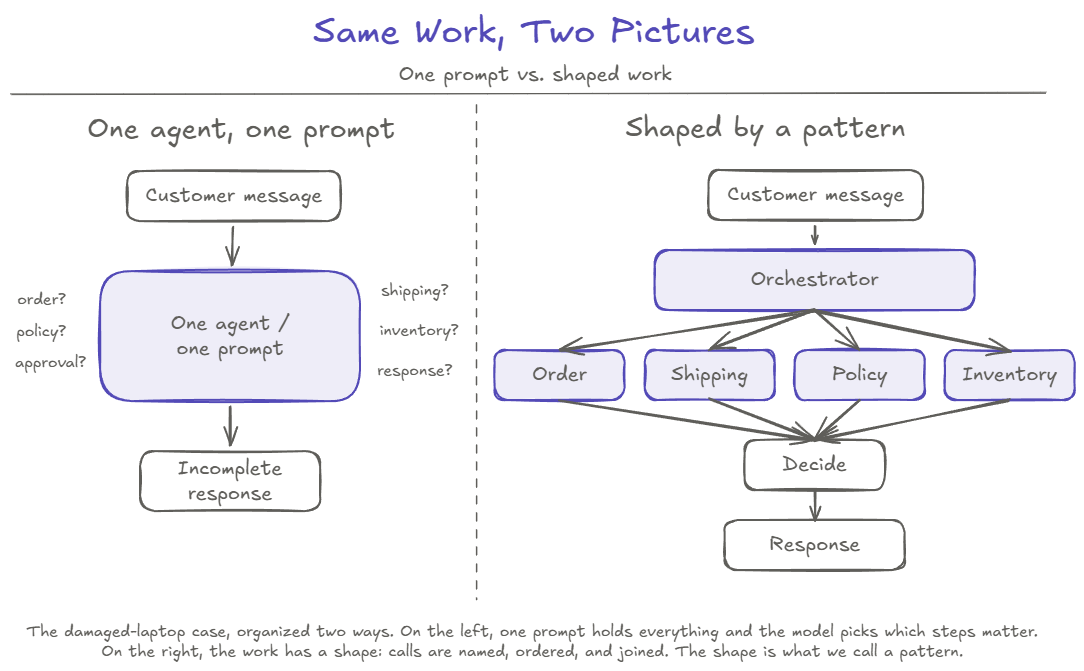
The five shapes we will work through come from Anthropic’s Building Effective Agents post. They appear here in the order the damaged laptop case asks for them. Anthropic presents most of these as workflow patterns within the broader family of agentic systems. Here they appear as composable shapes a larger agent system can use; prompt chaining, routing, and parallelization are not agents by themselves.
Pattern 1: Prompt chaining
A simple place to start is the final response. We are starting with the final response because prompt chaining is the simplest shape to see clearly, even though those response steps happen late in the full case. When the system has gathered the facts and made a decision, the response itself goes through a known sequence: summarize the case, draft the reply, check the tone, format it for the channel. Each step’s output feeds the next. The steps are fixed by the developer, not chosen by the model.
Plain definition: a fixed sequence of model calls where each call processes the output of the previous one.
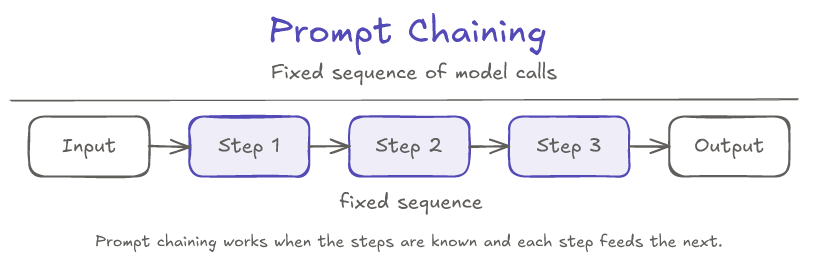
TechNova example. Before sending the final reply, a chain runs: (1) summarize the case from the gathered facts, (2) draft a reply that cites the relevant policy, (3) format the reply for the support channel. Each output feeds the next prompt.
What can go wrong. A chain is only as strong as the handoffs. If step 1 produces a malformed summary, step 2 happily continues with garbage. The fix is a gate: a small piece of code between steps that checks the output is shaped correctly before passing it on.
Control surface that matters. Termination. Chains end when the developer’s list ends. That bound is the whole point.
Termination: fixed-step. The chain ends when the developer-defined list of steps ends. Memory: latest-only. Each prompt sees the previous step’s output, not the full history.
Pattern 2: Routing
Before any of the seven jobs can begin, the system has to decide who should handle this case. The customer’s message could be a refund request, an order status question, a technical issue, a complaint, a fraud signal. Each goes to a different registered specialist. Routing is the first classification step, and the dispatch that follows.
Plain definition: a first call classifies the input into one of N predefined categories; code then dispatches to a specialist for that category.
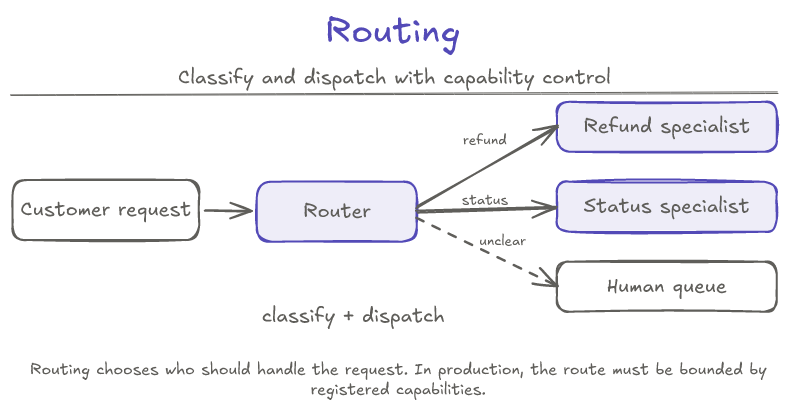
TechNova example. The customer’s message goes to a router. It returns damaged product, refund requested. The system dispatches to the support orchestrator. If the router’s confidence had been low, or the intent had been unrecognized, the dispatch would have gone to a human review queue instead.
The production angle. Routing is the place where most people stop. The model classifies, code dispatches, done. That framing misses the more important point: in production, routing is not just classification. It is capability control.
Think of it like an API gateway for agents. In a normal backend, you do not let one service own every responsibility; you decompose the system into services with clear capabilities. Routing applies the same engineering instinct to agents: the request is classified, then sent to the registered specialist that is allowed to handle that kind of work. The model may help understand the request, but the system (not the model) decides which registered specialist is allowed to act. The router can extract the wrong intent and route to the wrong specialist. The router cannot invent a specialist that does not exist, or grant a capability that has not been registered. Routing only to registered specialists does not make routing perfect. It makes routing bounded.
That bounding only matters if the specialists themselves are bounded. The ShippingAgent can look up tracking but cannot issue refunds. The RefundPolicyAgent can evaluate eligibility but cannot move money. The BillingAgent can issue refunds, but only when the orchestrator has gathered evidence and approval. Specialization is enforced by the tools each agent can call, not by what the prompt says. In this article, names like ShippingAgent and BillingAgent mean bounded specialist components. Some may be LLM-backed agents; others may be thin wrappers around deterministic services or APIs. The safety idea is the same: each specialist gets only the tools it is allowed to use. We will come back to this as a control surface; for now, the point is that routing only works as a safety mechanism if the specialists themselves are scoped.
What can go wrong. A confidently wrong classification routes the case to the wrong specialist. If that specialist has scoped tools, it returns unsupported and the case re-routes or escalates. If that specialist has unscoped tools, it improvises, and the system inherits the model’s mistake at full blast radius, with nothing else in the system stopping the wrong action.
Control surface that matters. Tool access and escalation. Routing is the front door; the locks are inside.
Termination: dispatch-complete. The router stops after it classifies the request and hands it to a registered specialist. The specialist’s own pattern decides what happens next. Memory: pass-through. The router passes the original message and routing result; the specialist starts with only the context it is given.
Pattern 3: Parallelization
For a damaged-product case, four checks need to happen: order status, shipping and damage evidence, policy, and inventory. None of them depend on each other’s output. The order lookup does not care what the policy says. The inventory check does not depend on the shipping status. There is no reason to do these one at a time.
Plain definition: the developer picks the independent checks in advance; code runs them at the same time and joins the results.
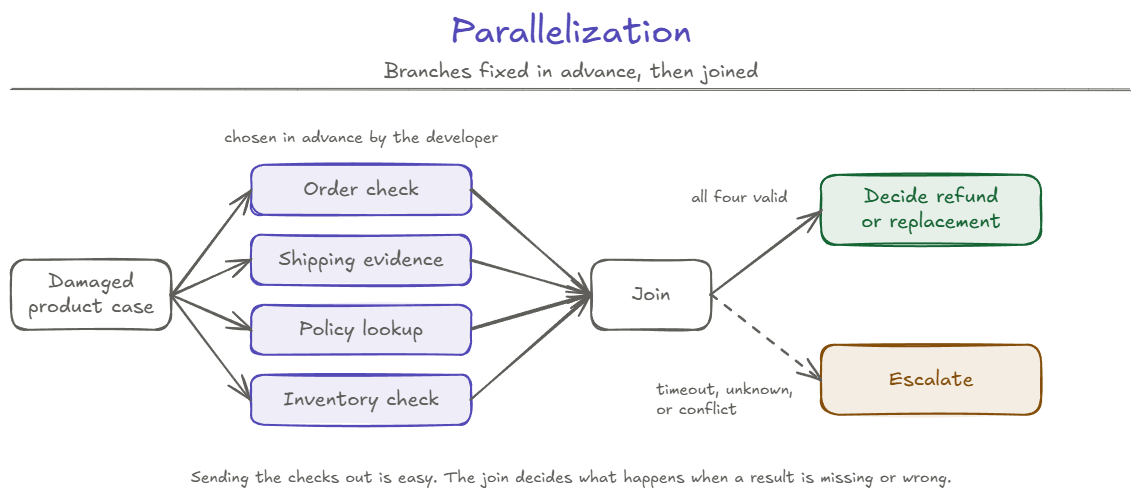
TechNova example. The developer has already decided that every damaged-product case gets the same four checks. Code then runs them in parallel: OrderAgent checks order status, ShippingAgent checks delivery and damage evidence, RefundPolicyAgent retrieves the relevant policy, and InventoryAgent checks replacement availability. When all four return, the join combines the results and the workflow decides what to do next.
The join. The fan-out, sending the independent checks in parallel, is the easy part. The discipline is in the join, where their results come back together.
Escalation is the conservative default in this design. A production system may retry, wait, or proceed with partial results when policy allows, but that choice should be explicit.
What can go wrong. Almost every failure mode of parallelization lives in the join. One branch times out: does the system wait, retry, proceed with three results, or fail the case? Two branches return conflicting facts: which one wins? One branch returns unknown: does the system treat that as a soft no, or as a reason to escalate? Parallelization is the easiest pattern to look right and behave wrong, because the fan-out is trivial and all the discipline sits at the join.
Each required branch also adds another place the workflow can fail. Parallelization improves latency, but it does not automatically improve reliability: the system is only as strong as its weakest required branch.
Control surface that matters. Termination: every branch needs a timeout, and the join needs a documented behavior when a branch never returns.
Termination: join-controlled. Each branch has a timeout, and the parallel step ends when the join has enough valid results according to policy or sends the case to retry/escalation. Memory: branch-isolated. Each worker sees the case and its own task; the join combines only the returned results.
Pattern 4: Orchestrator-workers
Parallelization works when the checks are known in advance. A support inbox is not always like that.
“Where is my order?” needs Order and Shipping. “My laptop arrived damaged. I want a refund.” needs Order, Shipping, Policy, and Inventory. “Is the 16-inch model back in stock?” needs Inventory.
An orchestrator reads the message and chooses which checks this case needs from a registered set of workers. It can only choose from workers the system has registered for this workflow.
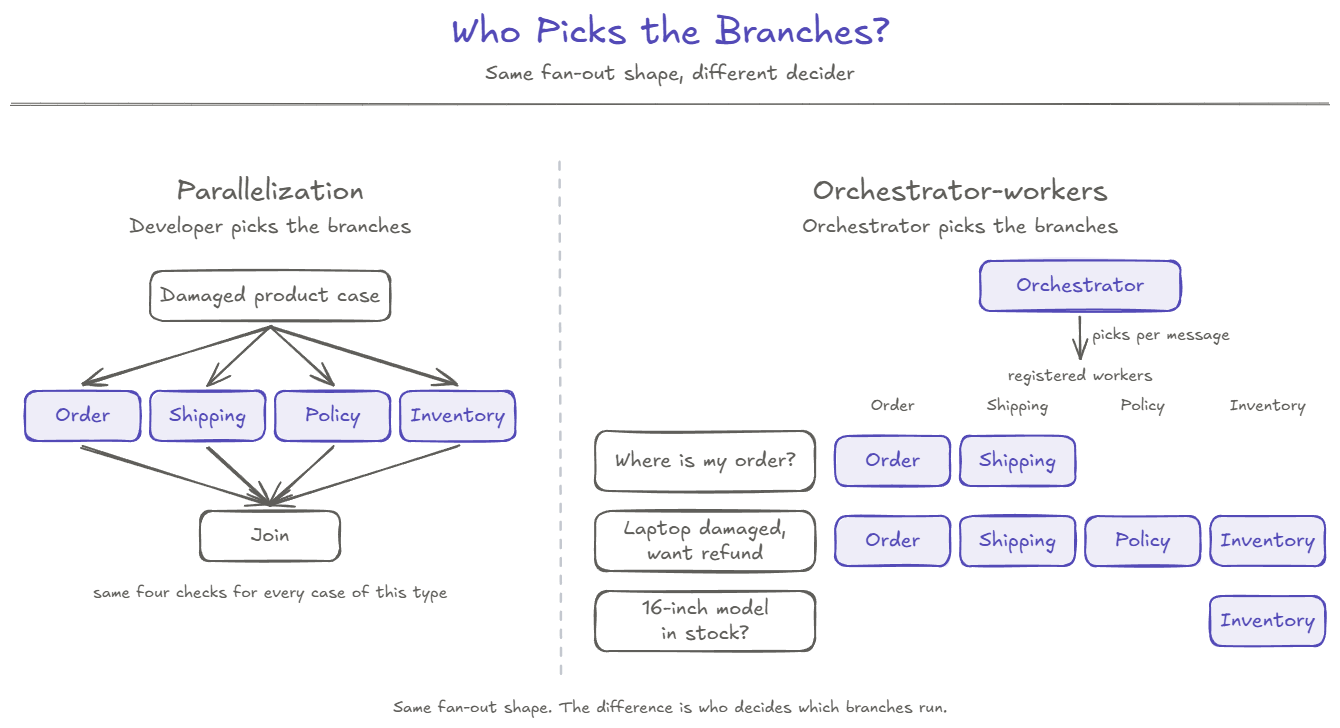
Plain definition: an orchestrator reads the input and chooses which subtasks it needs from a fixed set of workers; code sends each subtask to its worker; the orchestrator joins the results and decides.
If every message of one kind follows the same known plan, a fixed workflow is usually simpler than adding an orchestrator. Orchestrator-workers earns its extra complexity when the work needed changes with the input.
TechNova example. For the damaged-laptop message, the orchestrator decides this case needs all four checks. Those checks are independent, so this selected plan uses parallelization inside orchestrator-workers: OrderAgent, ShippingAgent, RefundPolicyAgent, and InventoryAgent run at the same time. Parallelization is still a separate pattern because it needs no orchestrator: when the checks are the same every time, code can simply run them in parallel. Inside orchestrator-workers, the orchestrator picks the checks, but code decides what can run at the same time and what must wait, based on the input each worker needs. Here none of the four checks needs another check’s result, so all four can run together; if the inventory check needed the laptop model from the order lookup, it would wait for that result while the other independent checks could still run at the same time.
When the workers return, the orchestrator joins their results into a working summary: order delivered, damage claim filed, evidence unclear, replacement available, and a $740 refund path may be allowed after return initiation and damage validation. Because the refund amount crosses a threshold, the orchestrator still routes through an approval gate before drafting any response that promises a refund. That approval gate is a control surface on the workflow, not what makes this orchestrator-workers.
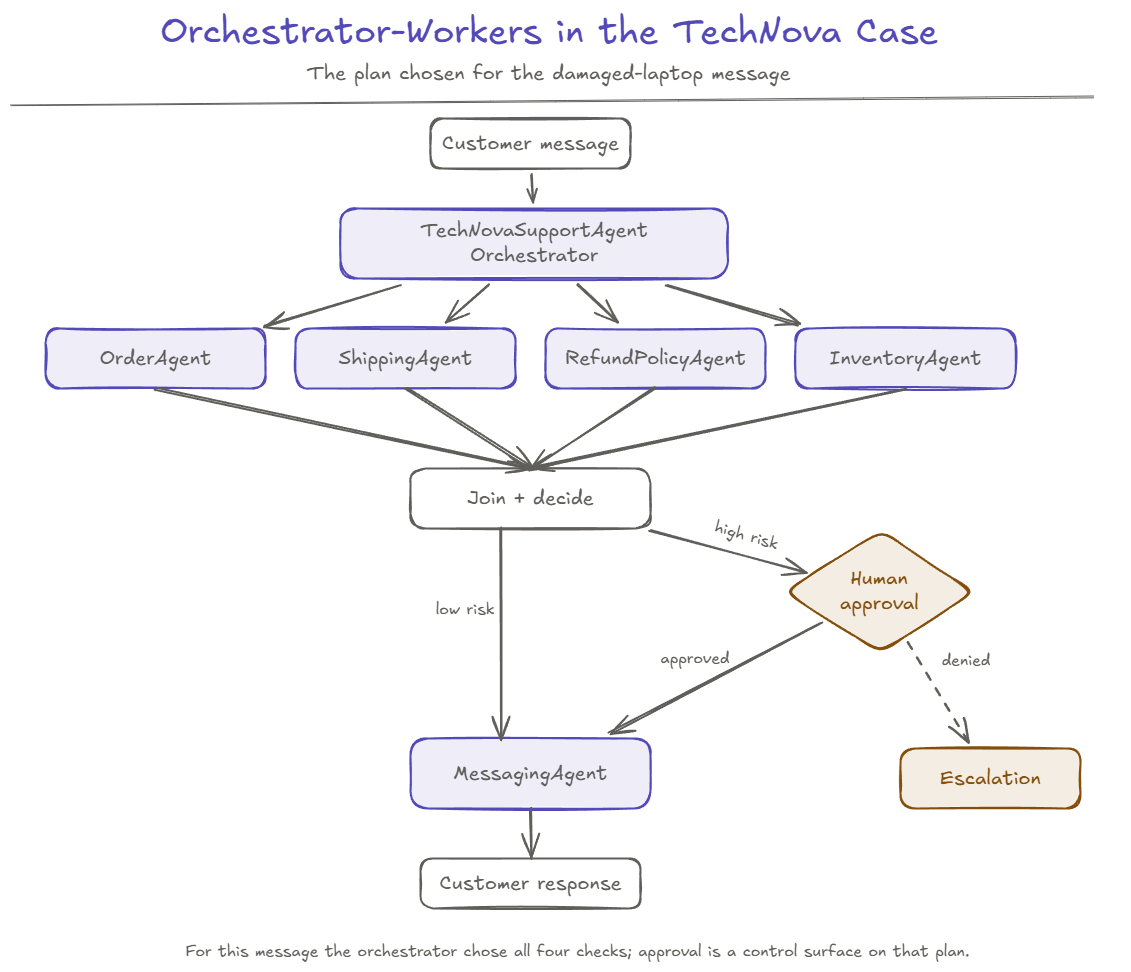
The “no God agent” rule. The orchestrator is not allowed to do everything itself. Its job is to plan, dispatch, collect, and decide, not also to own every domain capability. The moment one agent holds every capability, we are back to the Part 1 failure: one prompt, too many responsibilities, no boundary that catches a wrong step. Each worker should be small and focused. The RefundPolicyAgent evaluates eligibility; it does not issue refunds. The BillingAgent issues refunds; it does not evaluate eligibility. These responsibilities live in different agents on purpose.
What can go wrong. The orchestrator over-decomposes, the plan never terminates, or one slow worker stalls the whole case. The orchestrator also tends to drift toward owning more capabilities than it should; resisting that drift is half the work of using this pattern well.
Control surface that matters. Tool access (workers must be scoped), termination (the plan needs an upper bound), and approval (high-risk actions route through human sign-off).
Termination: plan-bounded. The orchestrator may choose the plan length, but maximum subtasks, retries, cost, and wall time must be enforced. Memory: broadcast. Each worker sees the original task plus its own subtask, but not other workers’ reasoning.
Pattern 5: Evaluator-optimizer
The orchestrator has the facts, the decision, and a proposed reply. Should that reply go straight to the customer?
For a high-risk customer response like this, usually not. But note what the evaluator can and cannot catch. It cannot prevent Part 1’s failure; that refund had already executed, and only tool-side validation and approval stop an action before it runs. The evaluator’s job is narrower: treat the reply as a draft and catch the unsupported promise, the policy mismatch, or the missing condition before it reaches the customer.
Plain definition: a generator LLM produces a draft; a separate evaluator call scores it against the rules; if it fails, the feedback goes back to the generator, which revises. The loop ends when the evaluator passes or when the system hits a cap.
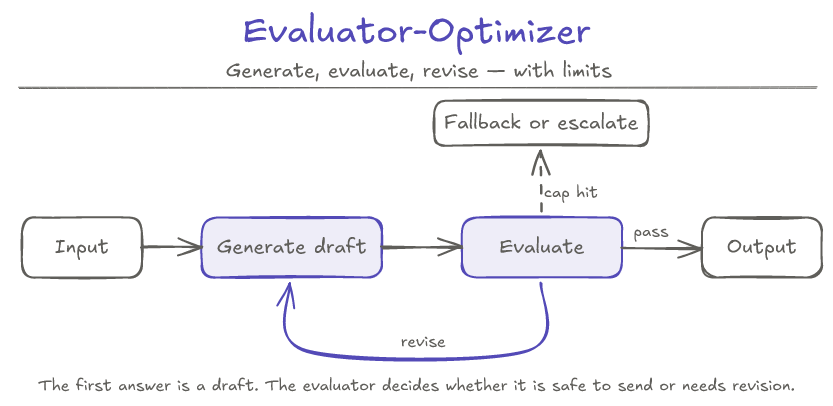
TechNova example. The orchestrator produces a draft: “We are sorry your laptop arrived damaged. We can start a replacement request now. A $740 refund can be reviewed after the return is initiated and the damage is validated.” The evaluator checks: does the response promise an immediate refund? No. Does it mention return initiation and damage validation? Yes. Does it cite the policy correctly? Yes. The draft passes and goes to the customer.
If the draft had said “a refund of $740 will be issued today”, the evaluator would have caught it, sent it back with feedback, and the generator would have revised before any version reached the customer.
What can go wrong. Two things, both serious.
The first is an unbounded loop. The evaluator never quite passes, the generator keeps revising, and the system runs until something else times out. Reference implementations sometimes ship without iteration caps. Production implementations must add them.
Every extra revision pass also adds latency and model cost, so iteration caps are not just safety controls. They are budget controls too.
The second is termination by exact-string verdict. If the evaluator emits “PASS” but the next call emits “Pass.” or “PASSED”, an exact-string check loops forever on the same draft. The pass check has to be more robust than the generator’s discipline about output format.
This pattern is also the right place to introduce self-correction: the principle that a high-stakes answer should be treated as a draft and validated against memory, policy, tool results, and approval rules before becoming final. The evaluator is one way to do that validation. Deterministic rules and human approval are others. For high-risk actions, deterministic validation and human approval are safer than model self-critique alone.
Control surface that matters. Termination (max iterations, timeout, fallback path) and escalation (when the evaluator never converges, the case has to go somewhere).
Termination: verdict-or-cap. The loop ends when the evaluator passes the draft, or when max iterations, time, or cost is reached and the case falls back or escalates. Memory: accumulated. The next generator call sees prior attempts and the evaluator’s feedback so it does not repeat the same mistake.
The five patterns at a glance
| Pattern | Shape | Best when | Stop condition | Main risk |
|---|---|---|---|---|
| Prompt chaining | Linear sequence | Steps are known and ordered | Step list ends | Garbage flows through the handoff |
| Routing | Classify and dispatch | A choice has to be made between specialists | Classification and dispatch complete | Wrong specialist with unsafe tools |
| Parallelization | Fan-out, join | Checks are known in advance and independent | All branches resolve or time out | The join fails silently |
| Orchestrator-workers | Plan, delegate, join, decide | The needed checks depend on the message | Plan completes or bound is hit | Orchestrator becomes a God agent |
| Evaluator-optimizer | Generate, critique, revise | The first answer is not the final answer | Evaluator passes or cap is hit | Unbounded loop |
These five are the shapes. They are not the whole design.
Vocabulary note. Different sources name these ideas differently. In this article, Routing includes what some sources call an Agent Router. Orchestrator-workers includes Supervisor Architecture and multi-agent planning. Human-in-the-loop appears here through approval and escalation; memory and RAG appear as control surfaces; tool routing appears through routing and scoped tool access rather than as a separate top-level pattern.
A short note on swarm
Some writers describe a sixth pattern: swarm. Agents self-select work from a shared task board, without a central coordinator. Swarm is useful for exploratory work (incident investigation, research, distributed data-gathering) where the work is not known in advance. It is risky for high-stakes actions like issuing refunds or canceling orders, because no single agent owns the final decision. TechNova’s damaged-laptop flow is exactly the kind of high-stakes decision you do not want a swarm to own. In most production support systems, an orchestrator on top of bounded specialists is safer. We mention swarm here as contrast, not as a core pattern.
Patterns give the shape. Control surfaces bound the behavior.
The pattern tells us how the work is arranged. The control surfaces decide how bounded that work is.
A control surface is a place where the system puts boundaries around the agent. It defines what the agent can call, what context it can use, when it must stop, when it must ask for help, and what gets logged. The same pattern can be safe or risky depending on these boundaries.
| Control surface | Question it answers | TechNova example | Failure if missing |
|---|---|---|---|
| Tool access | What can the agent call? | BillingAgent can issue refunds; ShippingAgent cannot |
A wrong-routed agent calls a dangerous tool |
| Memory | What does the agent remember? | Case state holds order_status = delivered, damage_claim = true |
The agent re-asks the customer the same questions |
| Operating contract | How is the agent expected to work inside this project or domain? | Support agent follows TechNova refund-handling rules and escalation expectations | Each run depends on whatever the prompt happened to say |
| RAG / knowledge | What grounds the answer? | Refund policy v3.2 retrieved with case | Confidently grounded in stale policy |
| Reasoning mode | Which review path does the risk require? | $740 refund triggers a layered review | The high-risk decision skips the check |
| Approval | Who validates the action before it runs? | Refunds over $500 require human approval | An unauthorized refund goes through |
| Escalation | When does the agent stop and ask? | Damage photo unclear → human review | The workflow guesses or hangs |
| Termination | When does the loop end? | Max 3 evaluator iterations | The loop runs forever |
| Observability | Can we see what happened? | Each decision logged with reason and source | No way to debug or audit |
A few of these deserve a sentence of clarification.
Tool access is one of the strongest control surfaces. Specialization should be enforced by the tools each agent can call, not by what its prompt says. When a request is routed to the wrong agent (and it will happen), the wrong agent should not have access to dangerous tools. It should reject, escalate, or return unsupported. Tool access does not make the model perfect; it makes the system safer when the model is wrong.
Memory is not “store everything.” It is the deliberate choice of what is safe and useful to reuse. Short-term memory is the application-managed working context for the current case, injected into each prompt. Long-term memory is persistent storage of facts worth keeping across cases. The model is not remembering anything; the application is deciding what to save, what to retrieve, and what to forget.
RAG was the subject of the previous series in this hub, so we will not re-teach it. The framing here is short: RAG is knowledge control, not magic grounding. If retrieval returns the wrong document, the agent is confidently wrong. If retrieval returns nothing, the safe behavior is to ask, retry, or escalate, not to guess.
Reasoning mode. In this article, reasoning mode means the review path the system selects based on risk and complexity, not an instruction to think harder. Simple tasks (“where is my order?”) need step-by-step tool use. High-stakes tasks (“refund $740 after partial shipment, evidence unclear”) need a more layered review. The reasoning mode should be routed by risk and complexity, not picked by the model based on the prompt’s vibe. In the TechNova case, the $740 amount does two different things. It selects a more careful review path before the decision, and it separately requires human approval before the refund action can run. Reasoning mode changes how carefully the system evaluates. Approval controls whether the action is allowed to execute.
Approval validates a proposed action before it runs. Escalation resolves an ambiguity or an authority gap. They are different surfaces. Approval is “I have decided what to do; please confirm.” Escalation is “I do not know what to do; please decide.” Escalation is not a failure of automation; it is a designed control surface for I should not decide this alone. The shape of the handoff matters as much as the trigger.
Operating contract is the stable instruction layer around the agent: what standards to follow, when to ask for clarification, how to verify work, what not to change, and when to escalate. It is different from tool access. Tools define what the agent can do; the operating contract defines how the agent is expected to behave while doing it. It is the operating rules for this project or this domain, encoded once rather than re-explained in every prompt. It does not make the agent smarter. It makes the agent more consistent across runs and across the people who invoke it.
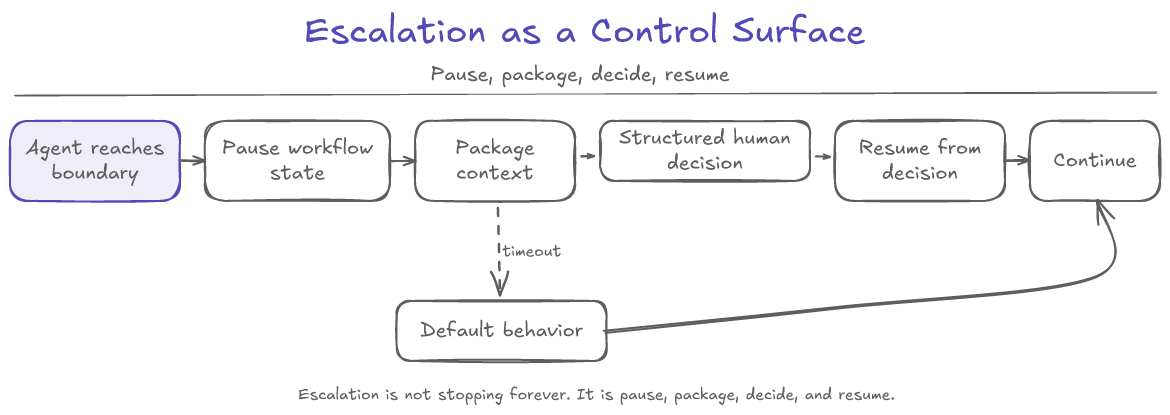
The escalation package should include the case id, the reason for escalation, the facts gathered, the policy involved, the specific uncertainty or missing evidence, the recommended options, and the decision being requested. The human response should include a structured decision code (APPROVE_REPLACEMENT, APPROVE_REFUND, REQUEST_MORE_EVIDENCE, ESCALATE_FURTHER, DENY_REQUEST) with optional notes that never become the control signal. Free text returns the system to “I have to interpret again,” which is what triggered the escalation in the first place.
The damaged laptop case, shaped
We can now retell the opening in one paragraph.
The customer’s message hits a router, which classifies it as a damaged product refund request and dispatches to the support orchestrator. The orchestrator decides this case needs four checks (order, shipping, policy, inventory) and runs them in parallel, each worker scoped to its own tools. The join produces a working summary: order delivered, damage claim filed, evidence unclear, replacement available, and a $740 refund path may be allowed after return initiation and damage validation. The amount crosses a threshold, so the orchestrator pauses and packages an approval request: facts gathered, policy cited, options listed, structured decision requested. The human approves replacement and defers the refund to a return-initiation step. The orchestrator resumes from that decision and produces a draft response. An evaluator checks the draft against policy and the case facts. The draft passes. The response goes to the customer.
That is the same seven jobs from the opening, organized by five patterns and constrained by the control surfaces that make those patterns safe.
Three Takeaways
-
Agent patterns are shapes, not safety guarantees. Prompt chaining, routing, parallelization, orchestrator-workers, and evaluator-optimizer describe how work is arranged. They do not automatically make the system safe. A pattern tells you how the work is arranged; the control surfaces decide whether that work is bounded enough for production.
-
Control surfaces matter as much as the pattern. Tool access, memory, operating contract, RAG, reasoning mode, approval, escalation, termination, and observability are where production behavior is shaped. The same orchestrator-workers pattern can be careful or dangerous depending on what the agent can call, what it remembers, when it stops, and when it asks for help.
-
The safest design is usually shaped work with bounded authority. In the TechNova damaged-laptop case, the system does not need one agent that can do everything. It needs named checks, scoped specialists, approval for high-risk actions, and a clear path to escalation. The more consequential the action, the more the system should prefer bounded specialists over a God agent.
Next: which of these shapes does a problem actually need, and does it need an agent at all? That is Part 5: Workflow, Agent, or Single LLM Call: How to Decide.