TechNova is a fictional company used as a running example throughout this series.
Part 2 named the control loop1 in five words: observe → decide → act → check → repeat.
That’s the shape. Here’s what it looks like in actual production, four turns into a multi-turn cancellation case:
Turn 1. Priya: “I’d like to cancel order #4471 and get a refund.” Agent observes the request, decides to check order status first, calls
get_order_status(4471).Turn 2. Tool returns: “status: shipped, carrier: FedEx, tracking: 1Z…, estimated delivery: tomorrow.” Agent observes the result, decides the cancellation procedure says don’t cancel shipped orders, plans to offer return or escalation.
Turn 3. Agent to Priya: “This order shipped yesterday, would you like me to start a return when it arrives, or connect you with a human agent?”
Turn 4. Priya hasn’t replied yet. The conversation is paused on a decision the agent isn’t allowed to make alone. The active context now holds: the original cancellation request, the order status, the procedure decision, the offered options, and the waiting state.
By turn four, three engineering problems are alive at the same time:
- State: the agent’s working state has a paused task waiting on Priya’s choice: start a return after delivery, or hand off to a human agent.
- Stopping: the original task is paused, not done. When does this conversation end? Which outcome counts as “complete”?
- Context: the active context window holds tool outputs, retrieved text, planning notes, and an in-progress decision. Some of this is needed for the next turn. Some of it is not.
The five-word loop hasn’t changed. But each step now has to do real work, and the wrong answer to any of these three problems is what makes production agents fail in the ways Part 1 named.
This article is about each problem, in order.
We’ll walk through what each loop step actually does, then dig into state discipline, stopping discipline, context discipline, and traces.
The Loop in Five Words
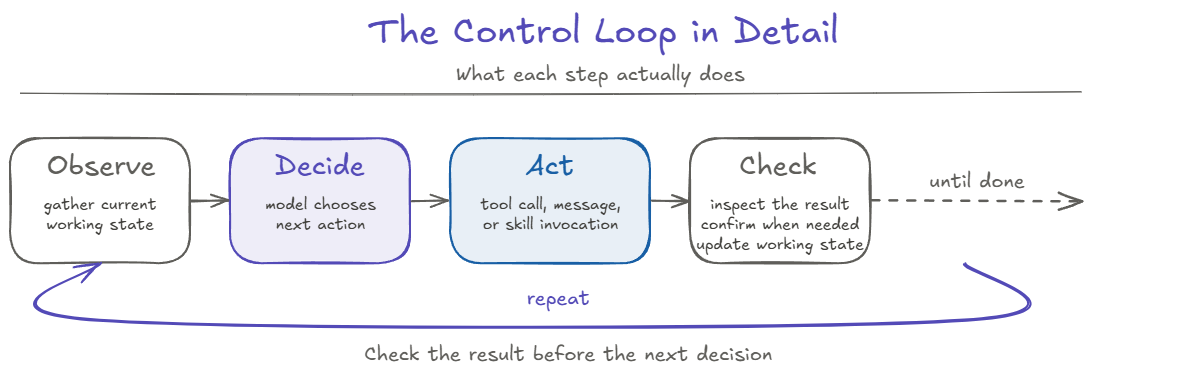
The loop from Part 2: observe → decide → act → check → repeat. Same five words. Different question now: what does each step actually do?
| Step | What it does |
|---|---|
| Observe | Gather the current working state: the relevant pieces for this turn (the user’s most recent request, the current task, the tool results from the previous turn, the constraints from any active skill). Observe selects what is relevant for this turn; it does not include everything. |
| Decide | Model chooses the next action: call a tool, ask the user a question, or stop. The decision is constrained by what tools are available, what the current state allows, and what the procedure (if any) says is the next legitimate step. |
| Act | Whatever was decided actually runs: a tool executes, a message is sent, a skill is invoked. The act is what changes things in the world, and where most production failures cause damage. |
| Check | Result flows back. The tool may return what the agent expected, something different, an error, or a timeout. The check step reads what actually came back before the next decision. |
| Repeat | Loop runs again with new state, until the agent decides it’s done, escalates, or the application stops it. |
For consequential actions, a successful tool response is not always enough to prove the real-world side effect happened. Part 6 goes deeper on that boundary.
The order matters. Because the agent checks what happened before deciding again, the system has a place to stop, ask for confirmation, or escalate before the next action.
One practical detail affects the decide step directly: the model chooses tools from the names, descriptions, and arguments the application says each tool accepts. Clear tool descriptions help the model choose the right action and avoid retrying errors that will never succeed. Part 6 covers tool design in the production build.
Planning Happens Inside the Loop
An agent does not have to follow its first plan unchanged. Each new observation can change what should happen next.
In Priya’s case, the first plan might be: cancel the order, then refund the customer. But the order-status tool returns shipped. That new information changes the situation. Cancellation is no longer allowed, so the agent has to choose a different next step.
This is the same ReAct idea introduced in Part 2: act, observe what came back, then decide again. The important point here is that planning is part of the loop, not a one-time step before the loop starts.
When the agent changes direction, tracing should record the state it saw, the action it chose, and the result that caused the change. Part 7 covers traces in detail.
A workflow is different: the developer defines the allowed path in advance. An agent can adapt its next step based on what comes back. Part 5 looks at when each approach is the better fit.
State Carries Across Turns
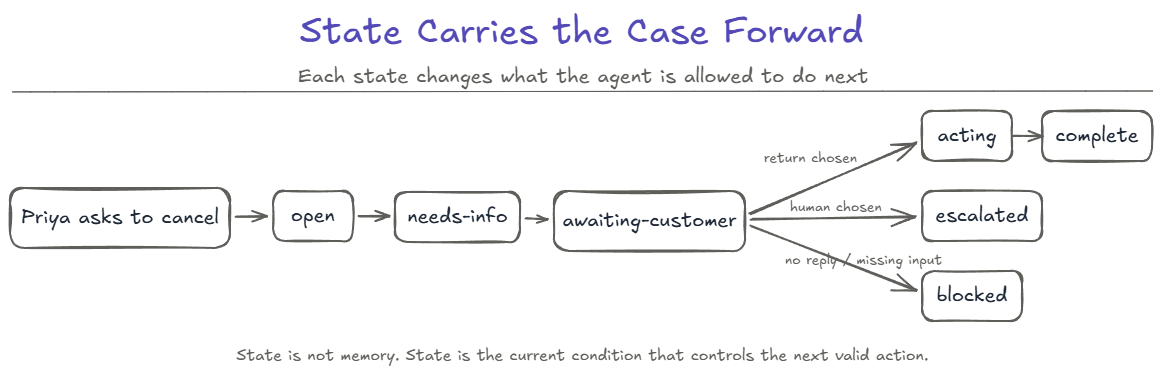
State isn’t just “what the agent knows.” State is what carries across turns: the working facts the next turn needs, and the task’s current status. That status can move through recognizable conditions, and each condition changes what the agent is allowed to do next.
The TechNova cancellation case can be modeled as a small state flow.
The common path moves through open → needs-info → awaiting-customer, with escalated, acting → complete, and blocked as branches the case can land in.
These aren’t decorative labels. Each state changes what actions are allowed. From awaiting-customer, the agent cannot call cancel_order without first receiving customer confirmation. From complete, the agent should not be making more tool calls. From escalated, the agent’s job is to summarize and stop, not to keep working.
The cancellation case walks through this:
- Turn 1: Priya asks to cancel. The agent calls
get_order_status. State moves fromopentoneeds-info. - Turn 2: The tool says the order shipped. Cancellation is no longer allowed, so the agent decides to offer alternatives. The state records the shipped order and the new decision.
- Turn 3: The agent presents the options. State moves to
awaiting-customer. - Turn 4: Priya hasn’t replied. The task is paused, still
awaiting-customer. Paused tasks waiting on customer choice should not be silently re-decided.
Production agents handle this by modeling state explicitly: a state object passed turn-to-turn, a status field in a database, a structured tag in the system context, not by hoping the model keeps track of it in the prompt. The form varies; the discipline doesn’t: state changes are explicit events the system records and can react to, not implicit transitions in natural language.
The key point is simple: state changes should be explicit, recorded, and available to the next turn.
When Does the Loop Stop?
Stopping has to be explicit. The system should not simply hope the loop ends on its own.
Part 1 said: “The demo stops when the engineer stops it. Production has to stop itself.” That sentence hides four distinct stopping conditions production agents actually need:
-
Final answer. The agent has done what was asked and produced the user-facing result. Stop and return. This is the cleanest stop, and the easiest to get wrong: the agent thinks the task is done when the side effects didn’t actually complete.
-
Maximum iterations. A bounded loop count. If the agent hasn’t reached a final answer in N turns, stop and report what it tried. This protects against infinite loops that compound cost and damage. The bound is a real engineering choice: too low and useful work gets cut off; too high and runaway loops eat money before anyone notices.
-
Blocked. The agent cannot proceed without a piece of information or a permission it doesn’t have. Stop, summarize what’s blocking, hand off to whatever can unblock it (the user, a human agent, a different system).
-
Escalated. The agent recognizes the case is outside its authority. Not a failure, a designed handoff. Stop the agent loop, route to a human or a more-authorized system, and let that system pick up the case.
Blocked and escalated are related, but they are not the same. Blocked means the agent is missing something required to continue: information, permission, or a system result. Escalated means the agent has enough information to know the case is outside its authority. Blocked asks, “What do I need before I can continue?” Escalated says, “I should not continue.”
In Priya’s case, the loop does not end just because the first action failed. It changes shape. If Priya chooses a return, the agent may move into an acting state and complete the return flow. If she chooses a human agent, the agent stops by escalation. If she never replies within the allowed time, the task moves to blocked on customer input. Same conversation, different valid stopping points depending on what happens next.
Two production failure modes around stopping, both worth naming:
- The agent stops when it shouldn’t: it says “Done!” but the side effects didn’t complete, or completed wrongly. This is Part 1’s confident-and-wrong failure mode at the stopping boundary.
- The agent doesn’t stop when it should: it keeps retrying, keeps re-planning, keeps looping. Every turn costs tokens and time; repeating a destructive action, such as issuing a refund twice, multiplies the damage.
The key point is simple: production agents need explicit stopping conditions, not just a hope that the loop ends cleanly.
Context Is a Real Engineering Resource
The model’s context window is finite. That sentence sounds obvious, but most demos hide its consequences.
In a demo, the context fits. The conversation is short, the tool outputs are small, the retrieval is precise. The model has all the room it needs to reason.
In production, by turn four, the context is full of:
- System prompt and tool descriptions: the stable preamble that has to be present every turn.
- Conversation history: every user turn, every agent turn.
- Tool outputs: order status, retrieval results, error messages, partial successes.
- Retrieved policy text and any skill files loaded for the current task.
- Plans, decision notes, and attempts: including half-completed work and course corrections from earlier turns.
By turn ten, all of that has compounded. Useful information is now a smaller part of the context. Important state from turn two may be buried under tool outputs from turn seven.
A bigger context window does not remove the problem. A huge context window full of stale material can lead to worse decisions than a small one holding only what the next step needs. What matters is how much of the context is useful, not how much fits.
Two things start happening as the context fills with noise:
-
Context drift. Old information can compete with the current state. A plan from turn two may still be present on turn nine even though turn three already made it invalid. Important information can also become harder for the model to use when it is buried inside a long context.
-
Cost compounding. Long-running conversations carry more context into later turns, so token usage grows. Caching can reduce some repeated-input cost, but it does not remove stale information from the model’s active context.
Context therefore needs active management in a multi-turn agent. The goal is not to keep everything. It is to keep what the next decision needs.
Context Cleanup Preserves Working State
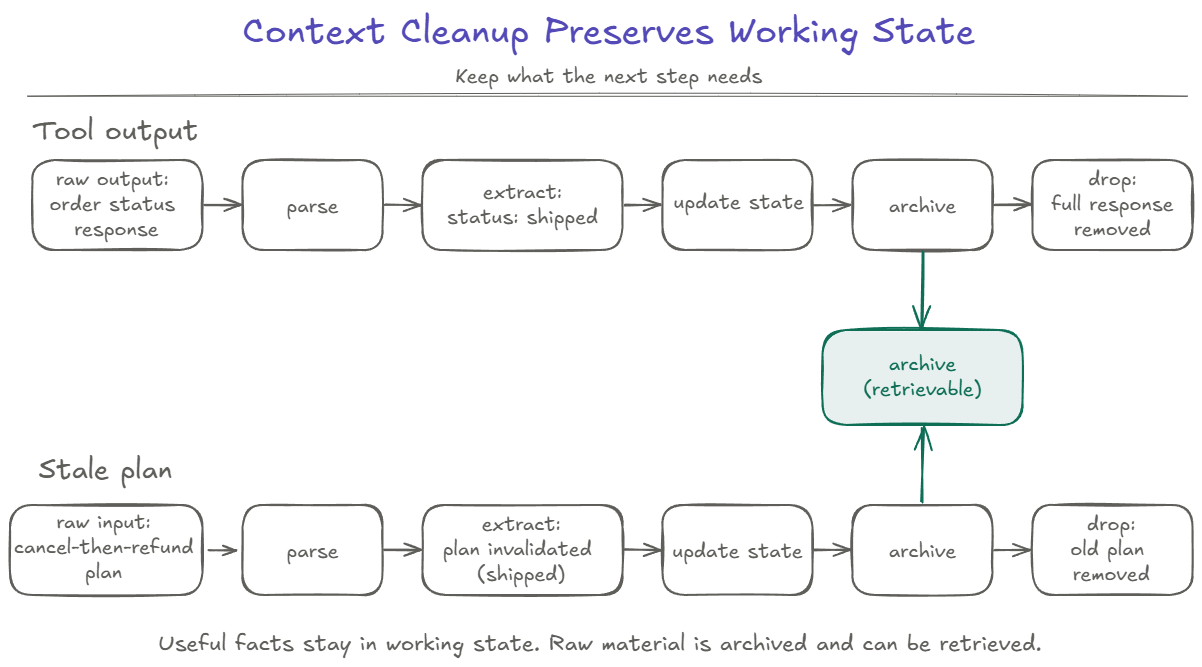
Context cleanup keeps the next decision focused on current, useful information.
Summarization can help make a long history smaller, but size is not the only problem. The system also has to distinguish information the next turn still needs from raw output, stale plans, and old attempts that no longer belong in active context.
A useful pattern is:
raw output → parse → extract useful facts → update current state → archive the full output → remove it from active context
The point is not to preserve every detail in the prompt. It is to preserve the working state the next decision needs while keeping the original material available if it becomes relevant again.
Walk through the same pattern using Priya’s order-status result:
- Raw output.
get_order_statusreturnsstatus: shipped, carrier, tracking number, estimated delivery, and other order details. - Parse. The system reads the structured response.
- Extract useful facts. The next decision needs the confirmed fact that the order has already shipped.
- Update current state. State records
order_status: shipped, cancellation is no longer allowed, and the case is moving toward return or escalation options. - Archive the full output. Keep the complete tool response somewhere it can be retrieved if later needed.
- Remove it from active context. The full response does not need to remain in every later prompt once the useful state has been recorded.
The same pattern applies to:
- Tool outputs: keep the useful structured facts in working state; archive the full result.
- Old plans: when a new observation invalidates a plan, keep the new decision and move the old plan out of active context.
- Failed attempts: if
cancel_ordercannot succeed because the order has shipped, record that conclusion instead of carrying the whole retry history. - Duplicate state: if the same fact appears several times, keep one current version.
- Decision notes: keep the conclusion the next turn needs; older intermediate notes do not all need to stay active.
In Priya’s case, active context should keep the confirmed order status, the available options, and the fact that the system is waiting for her choice. The full tool response, the old cancel-then-refund plan, and failed retry details can stay outside active context and be retrieved if needed.
Compressing history vs. preserving working state:
| Compressing history | Preserving working state |
|---|---|
| Makes a long history shorter | Decides what the next step still needs |
| May keep stale facts and old plans in compressed form | Keeps current facts and decisions active |
| Focuses on reducing size | Focuses on relevance for the next decision |
| Useful when a long history needs to be shortened | Useful throughout a multi-turn task |
These approaches can work together. A system may summarize older history while still keeping important state explicit and current.
After cleanup, active context should contain the information needed for the next decision. Older raw material can remain retrievable without staying in every prompt.
This happens as the loop runs. After each result, the system can ask: What changed? What does the next step need? What can leave active context?
Tracing the Loop, Turn by Turn
Everything in this article is invisible without traces.
A trace records, for each turn: what the agent observed (the working state at the start of the turn), what it decided (the chosen action and a brief recorded reason for choosing it), what it did (the tool call and arguments), what came back (the tool output), and how the state changed (state transition).
That structure isn’t optional. It’s how you debug production agents. When Priya’s refund-on-a-shipped-order happens in production, the only useful artifact is the trace of that conversation’s loop. Did the agent observe the shipping status? What did it decide based on what it saw? Did the tool description tell it shipped orders can’t be cancelled? Did the state transition correctly?
At minimum, the trace should show three layers:
- Tool call traces: what the agent called, with what arguments, and what came back.
- Decision traces: the selected action and the reason recorded for choosing it.
- State transitions: what state the agent was in, before and after each act.
Part 7 covers traces and evaluations as their own discipline. This article’s job is just to say: the loop has to be inspectable, every turn, or none of the discipline in this article is verifiable.
Three Takeaways
-
The loop is the easy part. The patterns wrapped around the loop are what determine production behavior. Observe → decide → act → check → repeat is a shape. What turns the shape into a working system is state discipline, stopping discipline, context discipline, and trace discipline.
-
Context cleanup should preserve working state, not just compress history. Parse each output, extract what the next turn needs, update state, and keep the rest outside active context but available if needed.
-
A control loop you can’t inspect is a control loop you can’t trust. Traces aren’t a debugging convenience. They’re how a team reconstructs what the agent saw, what it chose, and what changed.
Next: once the loop exists, what patterns organize the work, and what control surfaces keep those patterns bounded? That is Part 4: Five Agent Patterns and the Control Surfaces That Make Them Safe.
Footnotes
-
This series uses “control loop” as the primary term throughout. Some sources call the same mechanism an “action-feedback loop.” Both phrases describe the same thing; consistency in this series helps the reader build a single mental model across the series. ↩